[2026 Guide] DomoAI Coupon Code: 10% OFF All Plans (Tested & Verified)

Last updated: July 15, 2026

* This article contains affiliate links.

Hi, this is Kuronyankotan 🐱

The PR team behind the AI video generator DomoAI reached out to me directly and issued an exclusive coupon code just for readers of this blog! 🎉

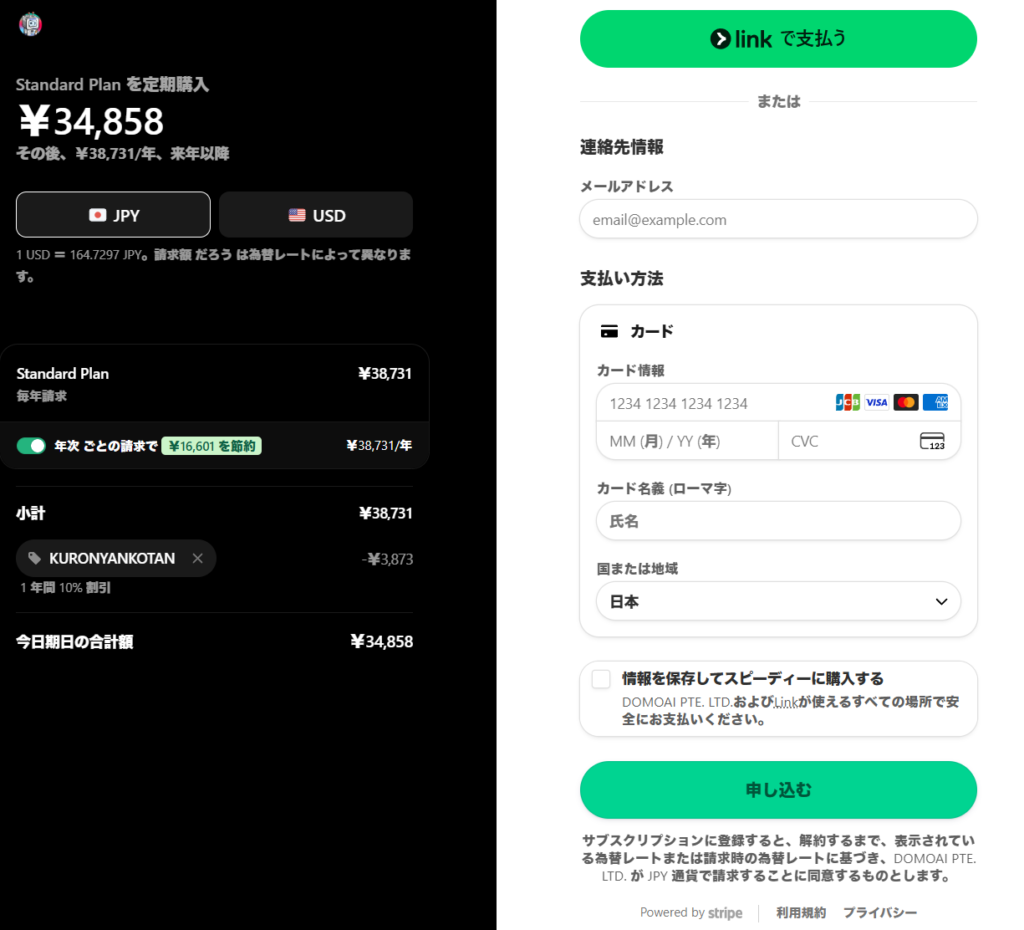
I tested it myself, and the 10% discount really works. (Screenshot below.)

🎁 Reader-Exclusive DomoAI Coupon 🎁

✅ 10% OFF verified — works on all paid plans

Plus, new users get 15 free credits on sign-up 🎁

KURONYANKOTAN

* Sign up free via the link above, then enter the code at checkout within 30 days.
10% off applies to both monthly and annual plans (credit top-ups excluded).

* The coupon may end without notice — grabbing it while it works is the safe move.

“I want to make animated videos, but it looks complicated…"
“Other AI tools are way too expensive…"

If that sounds like you, this guide will save you real money. Signing up without knowing this is simply losing money.

In this article I’ll cover the cheapest way to subscribe using the reader-exclusive coupon, plus DomoAI’s full feature set, pricing, and how it stacks up against competitors.

What You’ll Learn

  • An exclusive discount coupon code that works on every DomoAI plan
  • How to get 15 free credits and try it without paying
  • Monthly vs. annual plan — which one actually saves you more?
  • Why DomoAI’s value crushes Runway, Pika, and other rivals
  • The features that let total beginners make videos in 2 steps

About the Author

🐱

Kuronyankotan | AI tool testing geek
Paying subscriber of ChatGPT Plus / Claude Pro / Midjourney / Perplexity and more. I research how to squeeze the most value out of AI tools. I’ve paid for and tested DomoAI myself — no secondhand info here.

What Is DomoAI, and Why Is It So Popular?

DomoAI is a creative tool that lets anyone generate high-quality images and videos with cutting-edge AI.

The numbers speak for themselves:

  • 👥 4+ million active users
  • 🌍 One of the world’s largest Discord servers (top 10)
  • 🤖 70+ AI models

From professional creators to complete beginners, the intuitive interface is its biggest strength.

Its Image to Video and Video to Video (anime-style conversion) features are especially powerful — it’s become a must-have for anyone chasing viral short-form content 🎬

5 Things You Can Do with DomoAI

DomoAI packs a lot of features. Here are the five most useful ones.

1. Lip Sync (Talking Avatar)

★ The most popular feature!
Make a still character image speak your lines. The engine keeps improving and can now express breathing and emotion (whispering, anger, and more). Among the major tools, DomoAI is the only one this good at anime-style and stylized character mouths.

👉 Official feature page

2. Image to Video

Upload a single illustration or photo and turn it into a moving video.
For MV-style or cinematic scenes, the “Advanced" model is the way to go.

👉 Official feature page

3. Video to Video

Convert live-action footage (like dance videos) into anime, claymation, and 30+ other styles in just 2 steps. Those viral “dance cover turned anime" clips on TikTok and YouTube Shorts? This is how they’re made.

👉 Official feature page

4. Frames to Video

Upload 2–8 images and the AI fills in the gaps to create a smooth video. Perfect for turning a sequence of drawings into an animation.

👉 Official feature page

5. Character to Video

“I want my original character to dance!" — dream granted.
Upload a character image plus a dance video, and your character performs the same moves 💃

👉 Official feature page

On top of these, DomoAI also supports Text to Video and video upscaling up to 4K.

DomoAI’s 3 Biggest Strengths (Relax Mode Is a Game Changer)

Here’s why I recommend DomoAI over the alternatives:

  1. Videos in 2 steps (seriously easy)
    No complicated prompt engineering needed. Intuitive controls get you high-quality videos — it’s the most beginner-friendly tool I’ve used.
  2. Unlimited generation with Relax Mode 💰
    This is the killer feature. On the Standard plan and above, Relax Mode lets you generate videos without consuming any credits.
    Generation takes a bit longer, but you can iterate endlessly without fear of wasting credits. Competitors send you straight to top-up hell when credits run out… 😱
  3. Dedicated models for anime and original characters
    DomoAI has models specialized in anime styles and original characters (OCs), so stylized output looks fantastic out of the box.

Current Pricing Plans (Verified)

“So how much does it actually cost?" Here’s the up-to-date breakdown.
The coupon makes every one of these cheaper!

Monthly Billing

PlanPrice/moCredits~VideosFast lanesRelax Mode
(unlimited)
Basic$9.99500~303❌ No
Standard
Recommended!
$27.991,500~1003✅ Unlimited
Pro$69.994,000~2676✅ Unlimited

* The Pro plan additionally unlocks long-form videos (20s / 30s / 60s) in Fast Mode.

Annual Billing (30% OFF) + Coupon (10% OFF) Is the Ultimate Combo

Stack the coupon code on top of the annual plan and you get up to roughly 37% off the regular price!

PlanRegularAnnual (30% off)After 10% coupon
(per year)
You save
Basic$9.99/mo$6.99/mo ($83.88/yr)$75.49/yr$8.39
Standard ⭐$27.99/mo$19.59/mo ($235.08/yr)$211.57/yr$23.51
Pro$69.99/mo$48.99/mo ($587.88/yr)$529.09/yr$58.79

💡 Annual plan + coupon code is the cheapest possible route. If you plan to stick around, this is the way.

How to Use the DomoAI Coupon Code (10% OFF Verified)

Here’s exactly how to apply the discount.
When I tested it, the 10% discount applied to both monthly and annual plans!

📸 Actual checkout screen (screenshot)

Entering “KURONYANKOTAN" on the Standard annual plan gave me:

  • Subtotal: ¥38,731 (~$260)
  • Coupon discount (KURONYANKOTAN): −¥3,873 (10% off)
  • Total: ¥34,858 (~$234)
  • * Prices shown in JPY because I subscribed from Japan — the 10% discount works worldwide
DomoAI checkout screen showing 10% discount applied with coupon code KURONYANKOTAN

1. Go to the Official Site

Access DomoAI through the link below.

👉 Official link (15 free credits on sign-up)

2. Create an Account

Log in with Google, Discord, or another account.
Just signing up gets you 15 free credits to use right away!

3. Pick a Paid Plan

Head to “Pricing" or “Subscription" and choose a plan.
I recommend Standard or above — that’s where Relax Mode (unlimited generation) kicks in.

4. Enter the Coupon at Checkout

On the payment screen you’ll find a “Coupon Code" / “Promo Code" field.
Enter the code below and hit “Apply."

KURONYANKOTAN

5. Confirm the Discount & Pay

Double-check that the total dropped, then complete the payment.
Welcome to your discounted DomoAI life 🎉

Which Plan Should You Pick?

  • 🔰 Just want to dabble
    👉 Basic ($9.99/mo)
    A fine starting point — but credits vanish fast once you get hooked!
  • 🎨 Want to create freely without limits [Best pick]
    👉 Standard ($27.99/mo)
    Relax Mode means unlimited generations — iterate without fear. Best value by far.
  • 💼 Professional / heavy production use
    👉 Pro ($69.99/mo)
    6 fast lanes plus 20–60 second long-form videos. Built for volume.

DomoAI vs. Runway, Pika & Kling

There are plenty of AI video tools out there, but DomoAI’s value is on another level.
Here’s a comparison at similar plan tiers:

ToolPrice/moCreditsFast lanesUnlimited mode
DomoAI (Pro)$69.994,0006✅ Yes
Kling$64.998,000❌ No
Hailuo$124.9912,0005✅ Yes
Pika$95.006,000❌ No
Runway$95.002,250✅ Yes

As you can see, DomoAI is cheaper than its rivals yet includes unlimited generation (Relax Mode).
With Pika or Kling, once your credits run out, your only option is buying more. With DomoAI’s Standard plan ($27.99/mo) or above, you can generate endlessly.
Add the reader-exclusive coupon “KURONYANKOTAN" for another 10% off, and the value is unbeatable 💡

💰 DomoAI Standard value recap

  • 1,500 credits/month (~100 videos)
  • Unlimited generation via Relax Mode — no extra credits needed
  • Annual plan + coupon = $211.57/yr (just $17.63/mo)
  • Roughly 1/5 the price of Runway ($95/mo) or Pika ($95/mo)

FAQ

Q1: Can I use DomoAI for free?

Yes! You get 15 free credits when you sign up.
Try it without paying a cent first — sign up here.

Q2: How long is the coupon code “KURONYANKOTAN" valid?

It’s currently listed as long-term (no expiration), but it could end without notice.
Registering while it still works is the safe bet.

Q3: What about data safety and copyright?

According to DomoAI, uploaded images and videos are used only for generation and are not stored or shared.
Copyright of generated content belongs entirely to you.

Q4: Can I use the videos commercially?

Yes. Monetized YouTube videos and client work are both fine.
(Just watch out for the copyright of your source material.)

Q5: What is Relax Mode?

A “magic mode" available on Standard and above.
It generates videos without consuming any credits. It’s slower than Fast Mode, but let it run while you sleep or work and you can mass-produce videos endlessly!

Q6: Annual or monthly — which is the better deal?

Annual, hands down. It’s 30% off from the start — effectively about 4 months free.
If you’ll use it long-term, annual plan + coupon code is the ultimate money-saver 💰

Conclusion: The Coupon Is a Must for the Cheapest DomoAI

Thanks for reading this far 🐱
Thanks to unlimited generation (Relax Mode), DomoAI offers value no competitor matches.

👏 The cheapest way to start, step by step:

  1. Create a free account and grab your 15 credits
  2. If you like it, pick Standard or above (comes with Relax Mode)
  3. Choose the annual plan for an instant 30% off
  4. Enter coupon code “KURONYANKOTAN" at checkout for another 10% off!

Still on the fence? Just try the free tier first.
AI video creation is ridiculously fun — come join in 🎬

👇 Try it free 👇

Use this coupon for an extra 10% OFF:

KURONYANKOTAN

★ Reader-exclusive code, long-term validity, works on monthly and annual plans ★

Enjoy your AI life! (・ω・)ノ

More Ways to Save on AI Tools

I also cover discount routes for other AI tools I actually pay for:

AI,ITAI,DomoAI,English

Posted by kuronyankotan